



How to Redeem a Demme Learning Subscription or an Online Instruction With Video Redemption Code
NOTE: To redeem either access code, you will need to log in with your Demme Learning account or create a free account if you don’t already have one.
Redeeming an Individual – Essential Plan – Annual Access Card
If you are a new customer and do not have a new.demmelearning.com account.
- Scan the QR code on your access card or visit new.demmelearning.com/subscribe
- Scroll to the “Have a redemption code?” section.

- Enter your code as it appears on your card. Include any dashes ( – ) when typing it in.
- Click “Apply”. The Individual – Essential Plan – Annual option will automatically be selected. A green box will appear at the top of the page, confirming that your code has been applied.
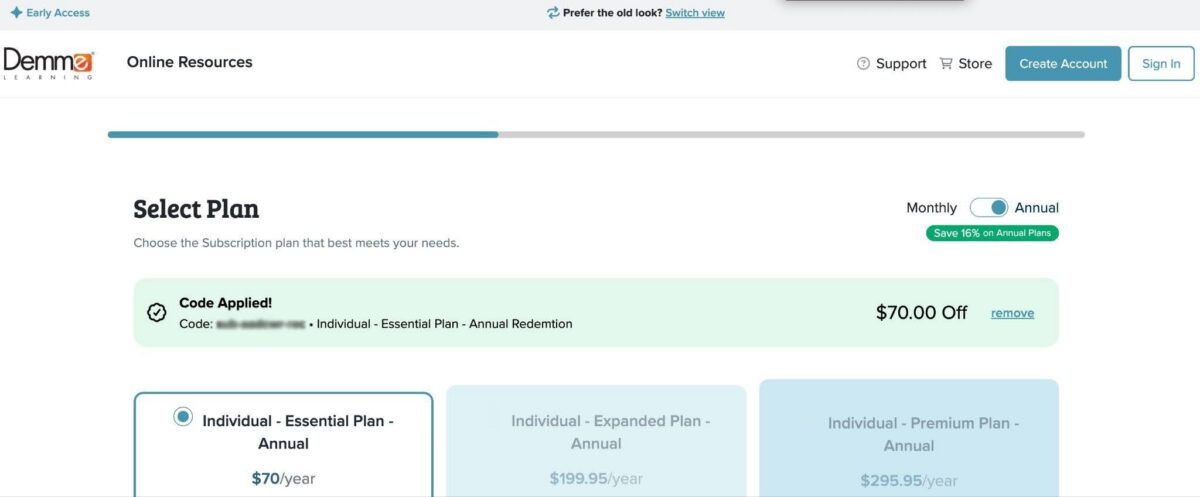
- Click “Next” to navigate to the next page. On this page you can add any additional student accounts or course credits you may need.
Note: The Individual – Essential Plan includes 5 student accounts and 2 course credits. Adding additional student accounts or course credits will be an additional cost.

- Click “Next” to navigate to the next page. Here you will enter your customer information. Once entered, click “Register”.
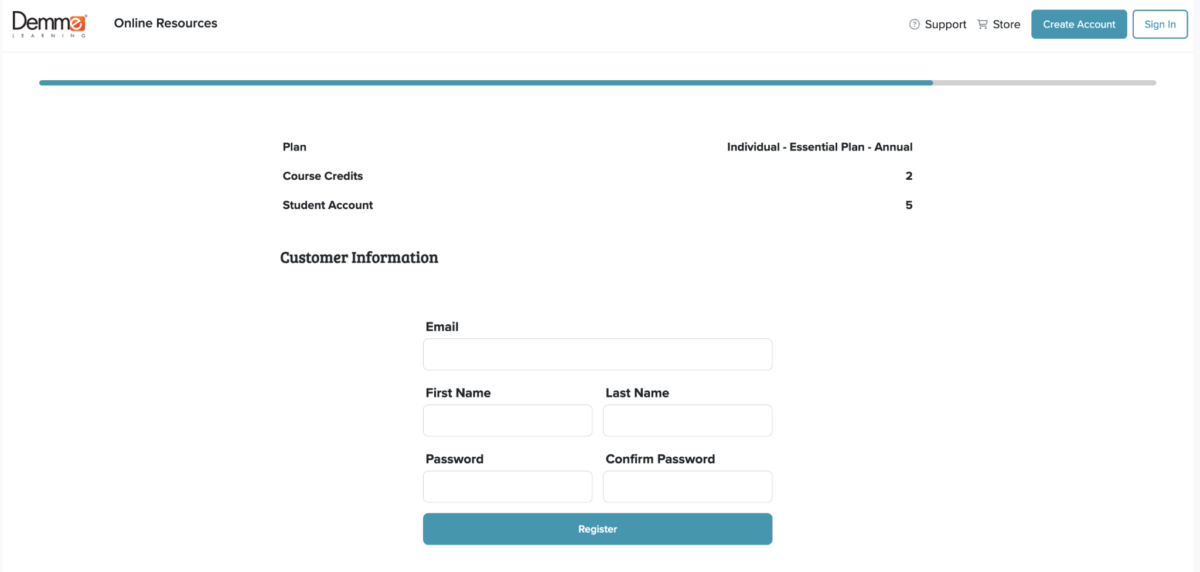
- Once registered, you will see a green box confirming your registration. Sign in to your new Demme Learning account to continue.

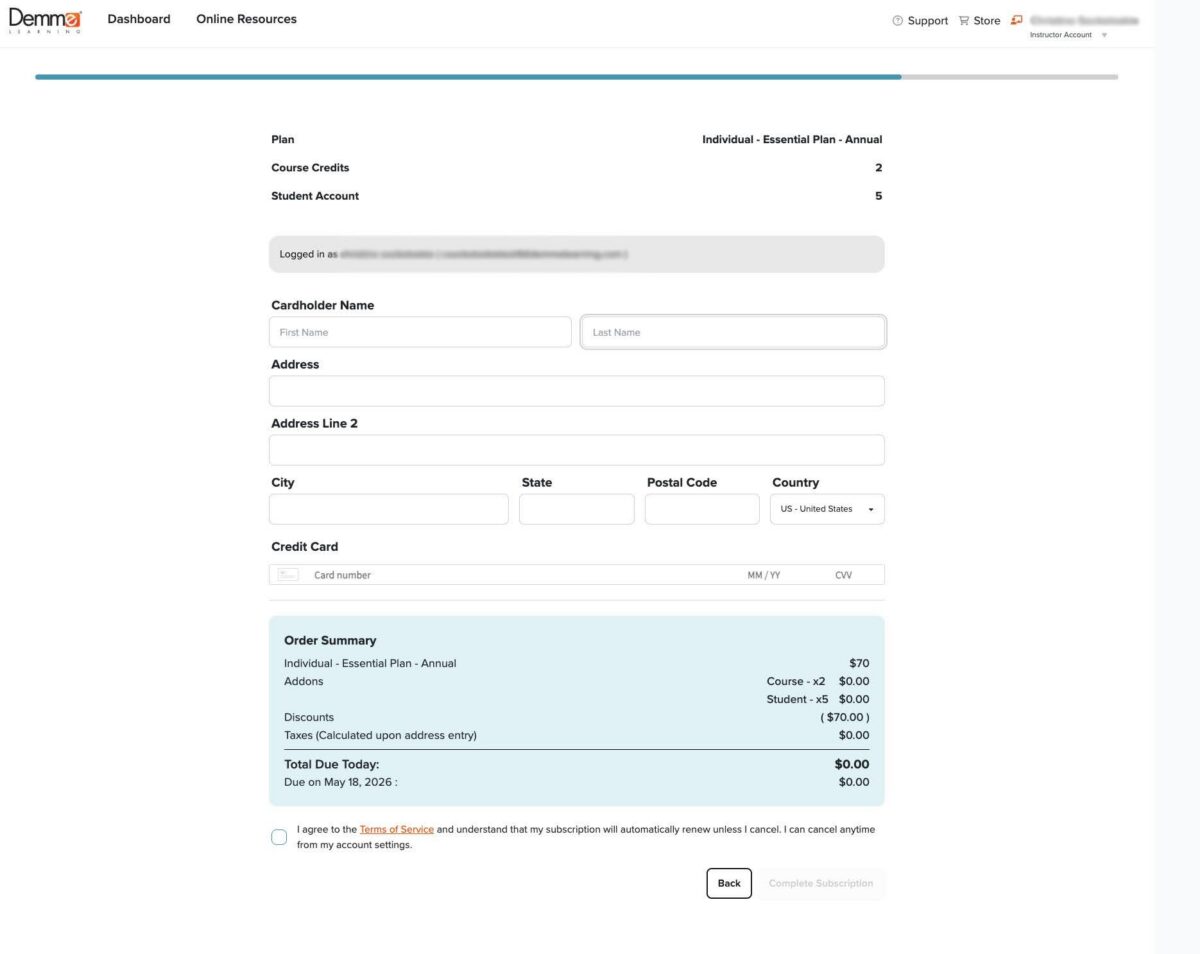
- Enter your billing information, review and check the terms and conditions box, then click “Complete Subscription”.
Note: At this time, it is a requirement of our self-service system to enter your card information, even though you have not added additional students or course credits, your total will be zero. Your card on file will be used when your subscription is renewed. If you do not want your card on file, you can continue to check out and then call our customer service team to ask them to manually remove your card, or call our customer service team to process the checkout for you.
If you are a returning customer who has an account on digital.demmelearning.com, but has not created a free subscription on new.demmelearning.com:
- Sign in as Instructor using your current username and password, at new.demmelearning.com
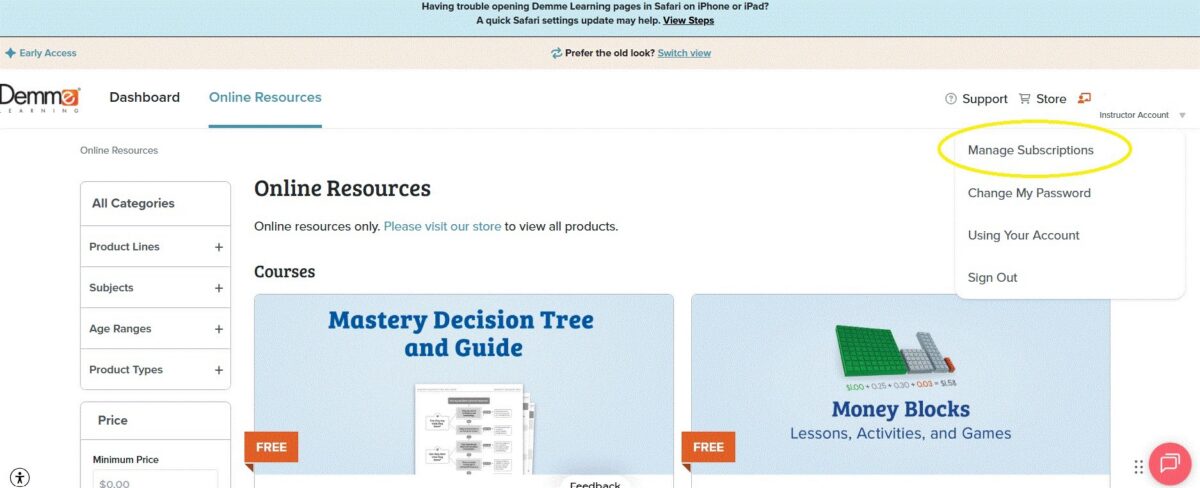
- Under your username, select from the dropdown menu: Manage Subscriptions
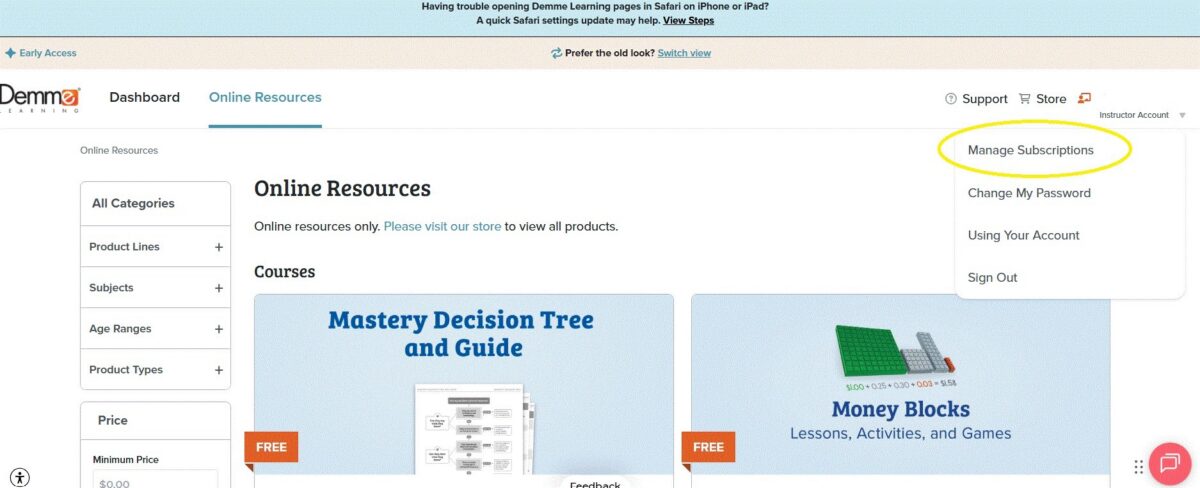
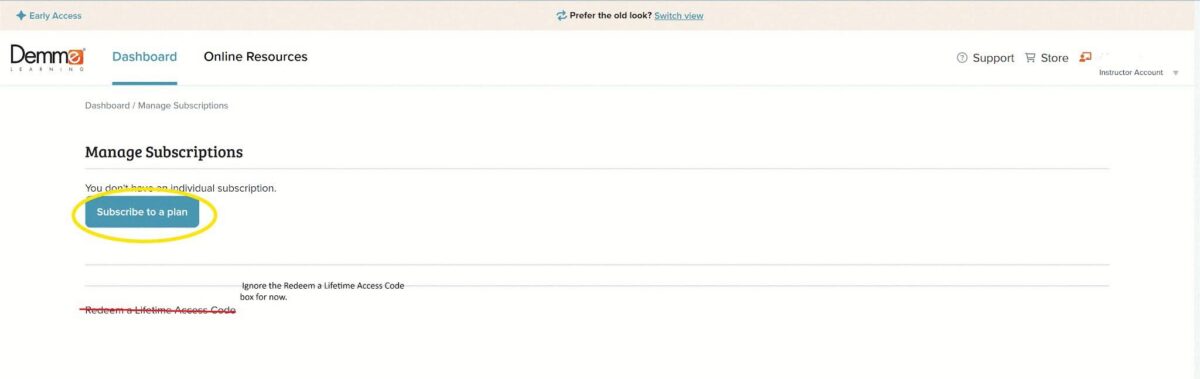
- Click Subscribe to a plan (do not enter any codes yet)
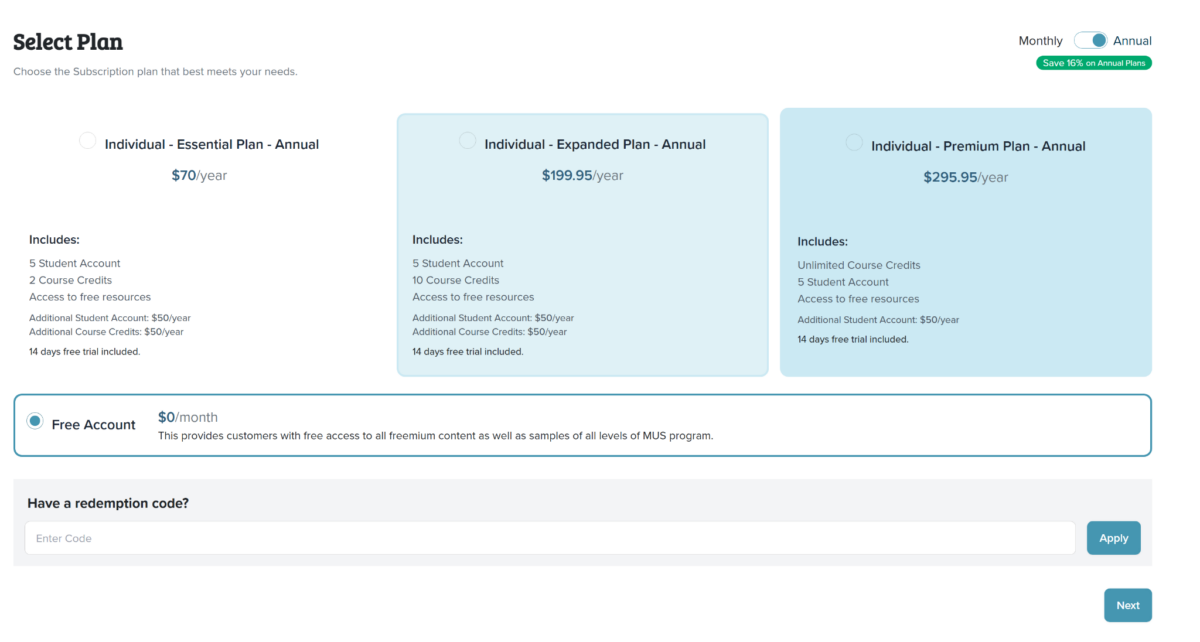
- Select Free Account, click next
- Customize Subscription page
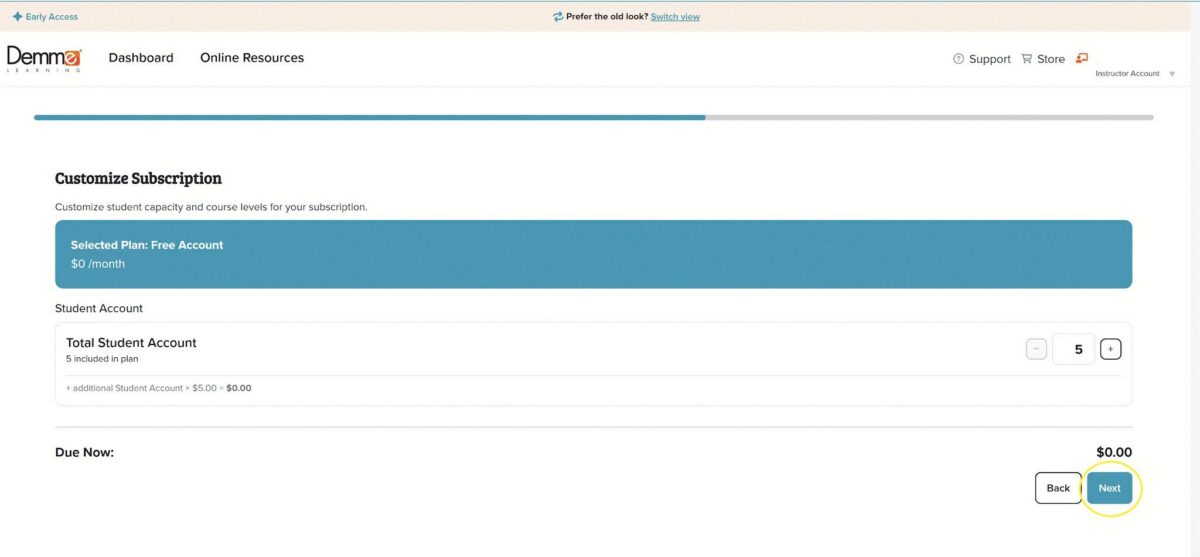
- Add any additional student accounts you may need. Free accounts allow for up to 5 students. If you do not wish to add any additional student accounts, click Next.
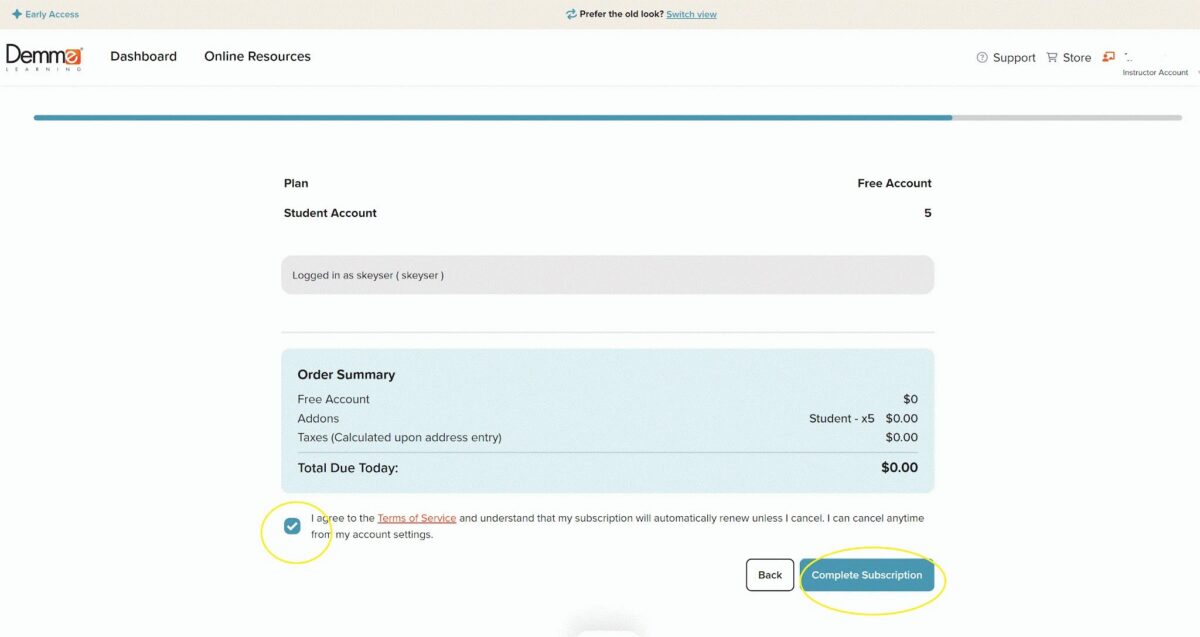
- Click Agree to Terms of Service, click Complete Subscription.
If you are a returning Demme Learning Customer who has an account on digital.demmelearning.com, but has not created a free subscription on new.demmelearning.com and needs to redeem the Online Instruction with Video access codes:
- Complete the steps for Creating a Free Subscription Account above first, and when you’re finished, select Manage Subscriptions
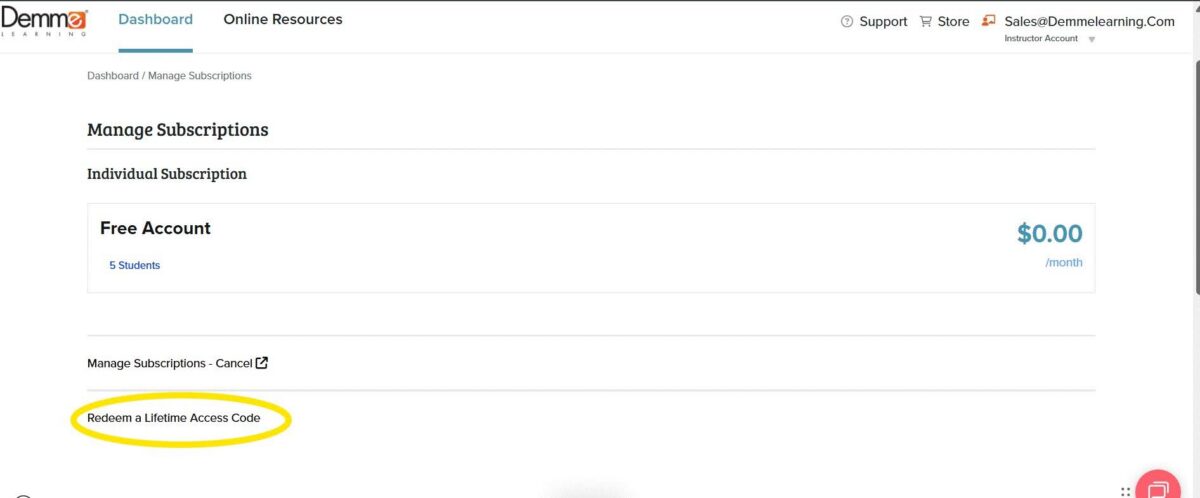
- Select, Redeem a Lifetime Access Code
- Enter your code exactly as it appears on your card. Include any dashes ( – ) when typing it in.
- Click “Apply”. You will see the confirmation page that your lifetime access code has been activated. You can now navigate to your dashboard and will have access to your Online Instruction with Video course in your library.
- Repeat the process for each card you are redeeming.
If you are a returning Demme Learning Customer who has an account on digital.demmelearning.com, but has not created a free subscription on new.demmelearning.com. And needs to redeem the Individual – Essential Access – 1 Year Subscription Card:
- Scan the QR code on your access card or visit new.demmelearning.com/subscribe
- Sign in to your account using the “Sign In” button on the upper right.
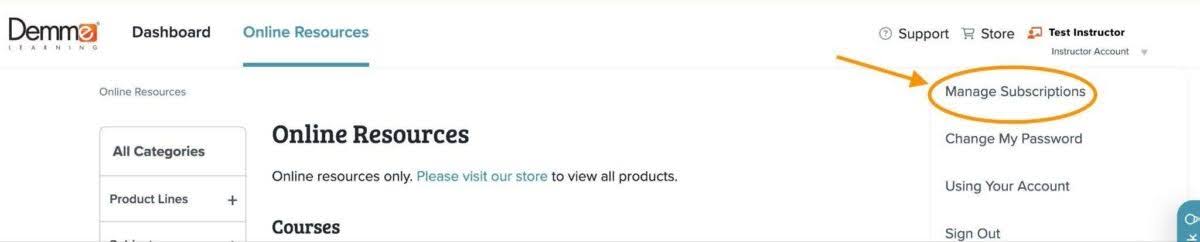
- After you are signed in, click on “Instructor Account” under your name in the upper right. Then click “Manage Subscription”.
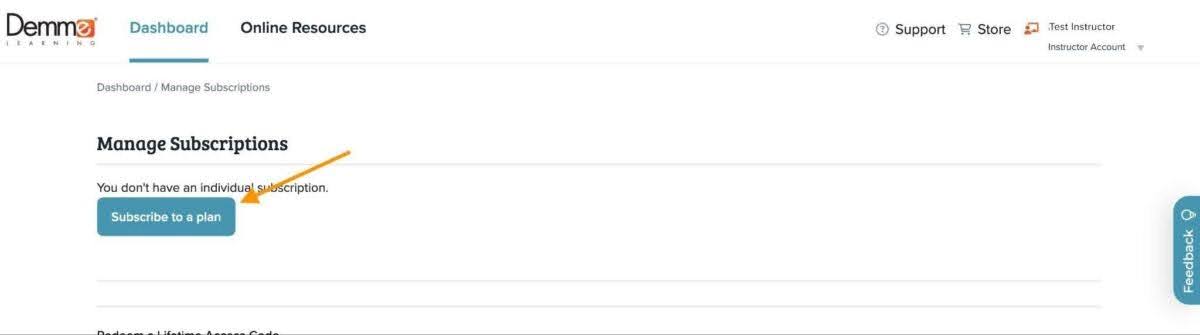
- In the Manage Subscription area, click on the “Subscribe to a plan” button.
- Scroll to the “Have a redemption code?” section.
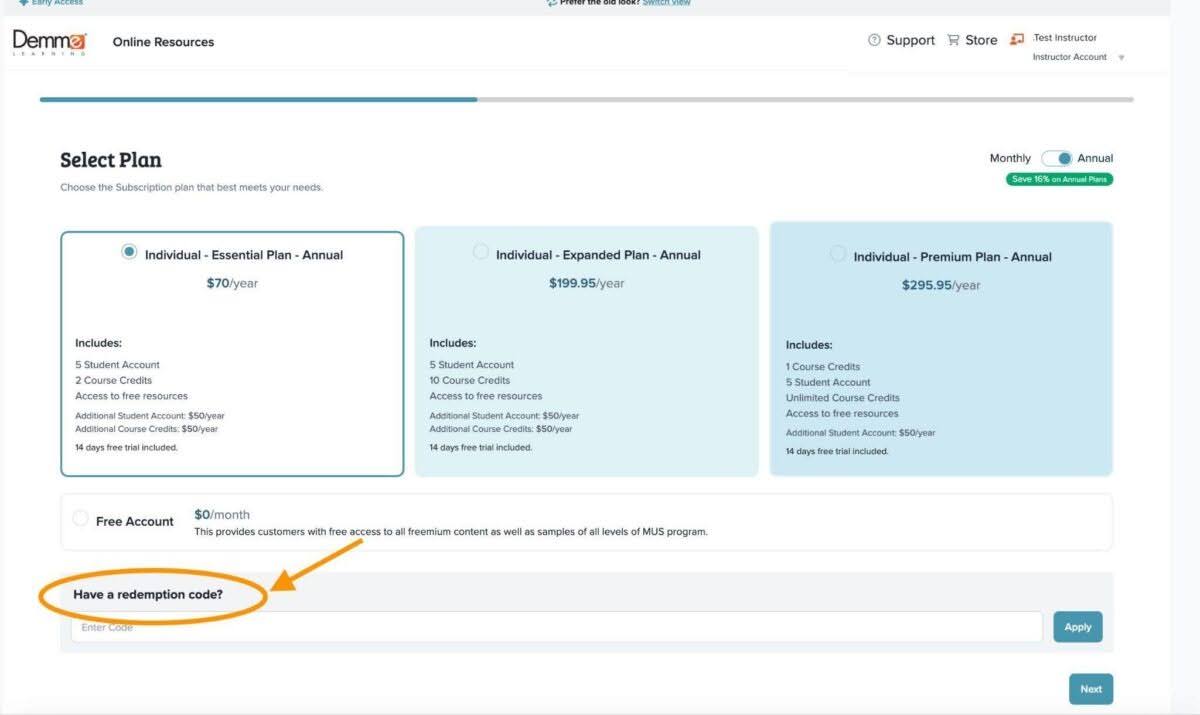
- Enter your code as it appears on your card. Include any dashes ( – ) when typing it in.
- Click “Apply”. The Individual – Essential Plan – Annual option will automatically be selected. A green box will appear at the top of the page, confirming that your code has been applied.
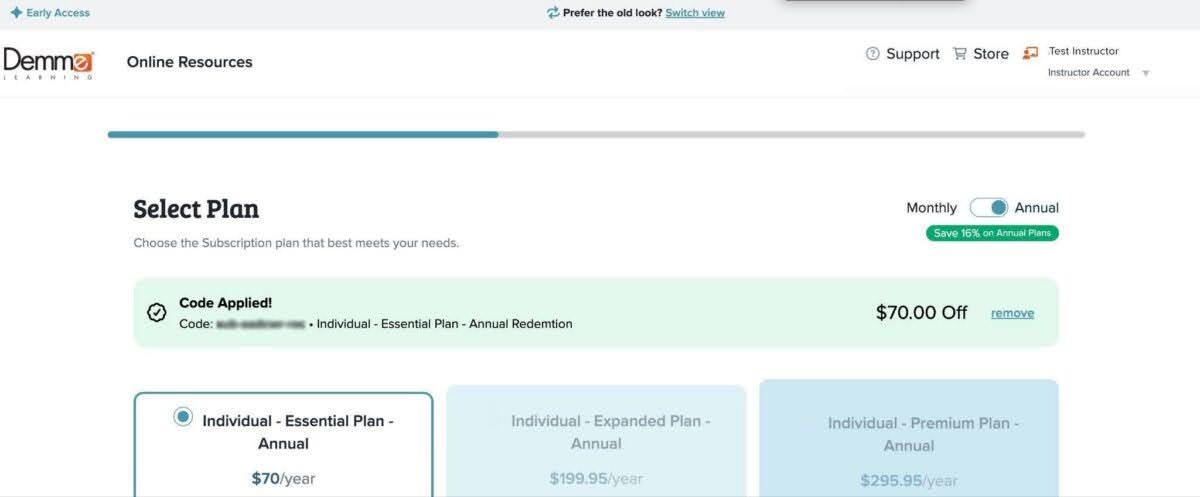
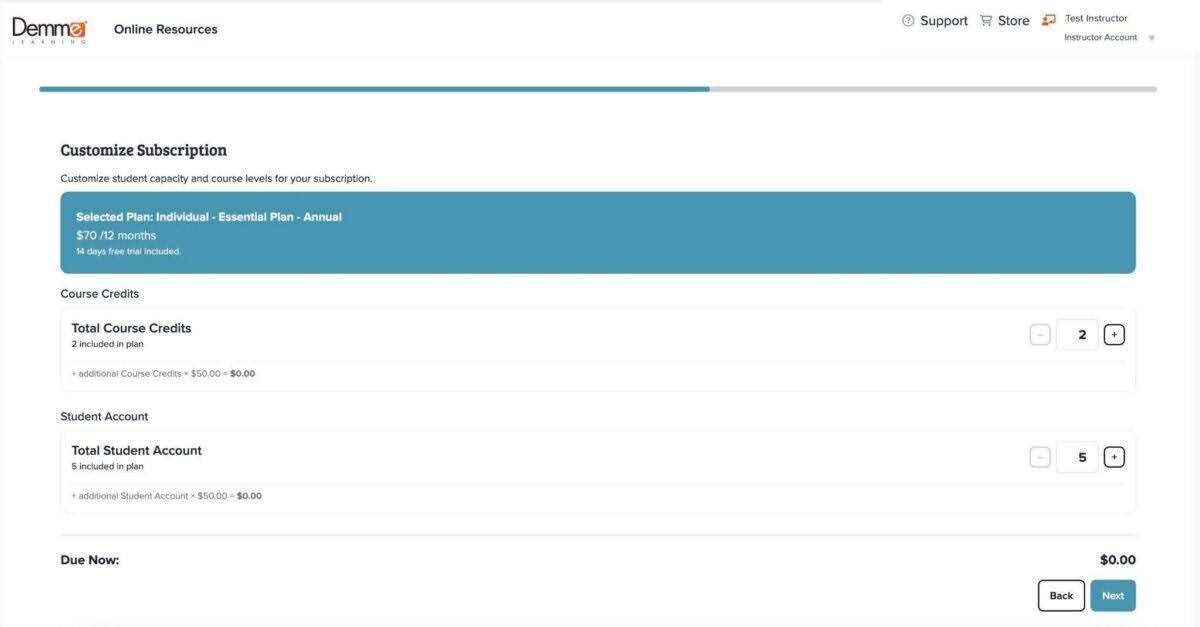
- Click “Next” to navigate to the next page. On this page, you can add any additional student accounts or course credits you may need.
Note: The Individual – Essential Plan includes 5 student accounts and 2 course credits. Adding additional student accounts or course credits will be an additional cost.
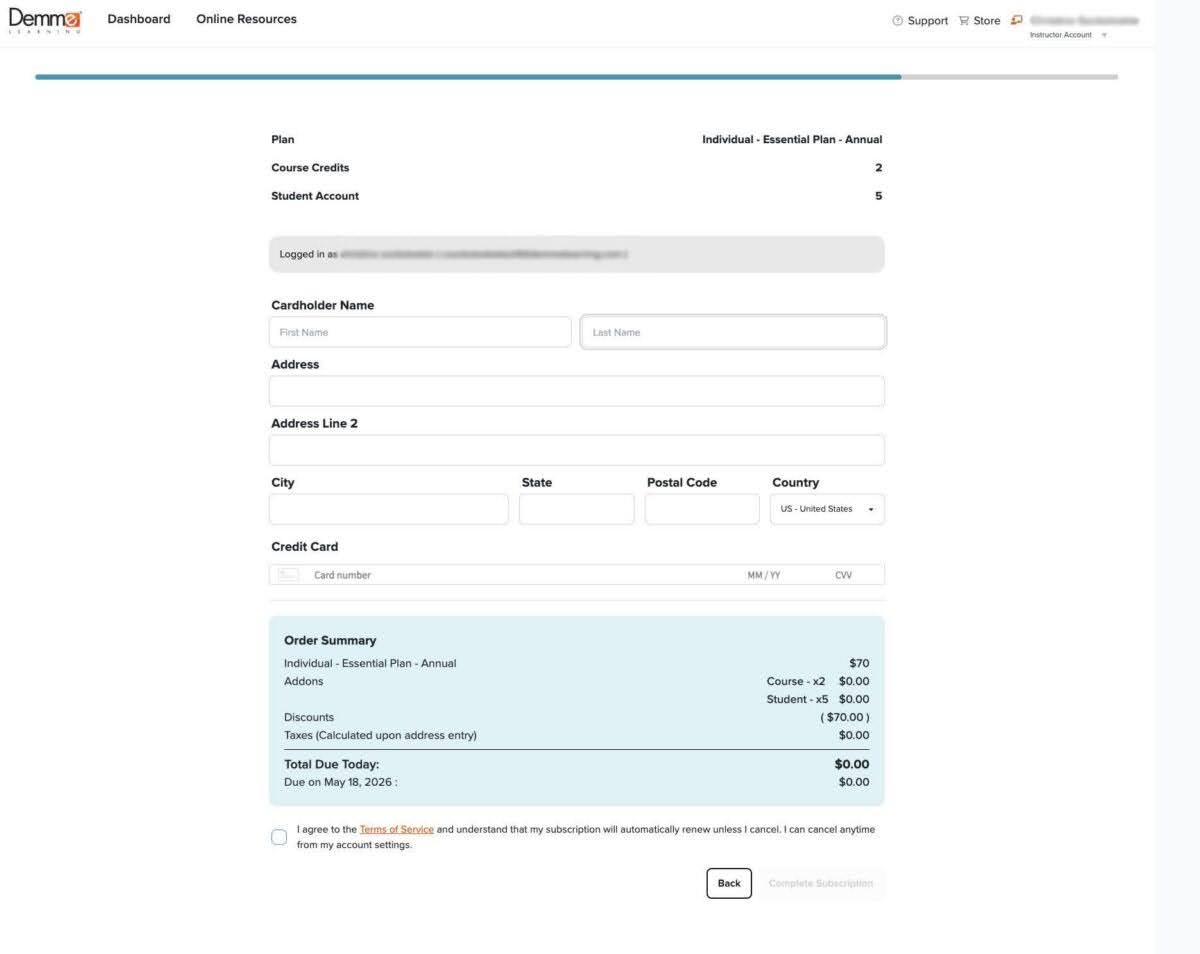
- Enter your billing information, review and check the terms and conditions box, then click “Complete Subscription”.
Note: At this time it is a requirement of our self service system to enter your card information, even though if you have not added additional students or course credits your total will be zero. Your card on file will be used when your subscription is renewed. If you do not want your card on file, you can continue to check out and call our customer service team to ask them to manually remove your card or call our customer service team to process the checkout for you.
If you are a returning customer with an active subscription on new.demmelearning.com it is important to note that at this time our system only allows one active individual subscription per account. Please hold onto your card till your current subscription expires (don’t worry, your student account, progress, and courses will not be lost). Once expired, you can sign up for a new subscription plan.
Redeeming an Online Instruction with Video code
If you are a new customer and do not have a new.demmelearning.com account.
- Navigate to new.demmelearning.com.
- Click the “Create Account” button in the upper right.

- Add any additional student accounts you may need. Free accounts allow for up to 5 students. If you do not wish to add any additional student accounts, click next.

- Click “Next” to navigate to the next page. Here you will enter your customer information and create your account. Once your information is entered, click “Register”.

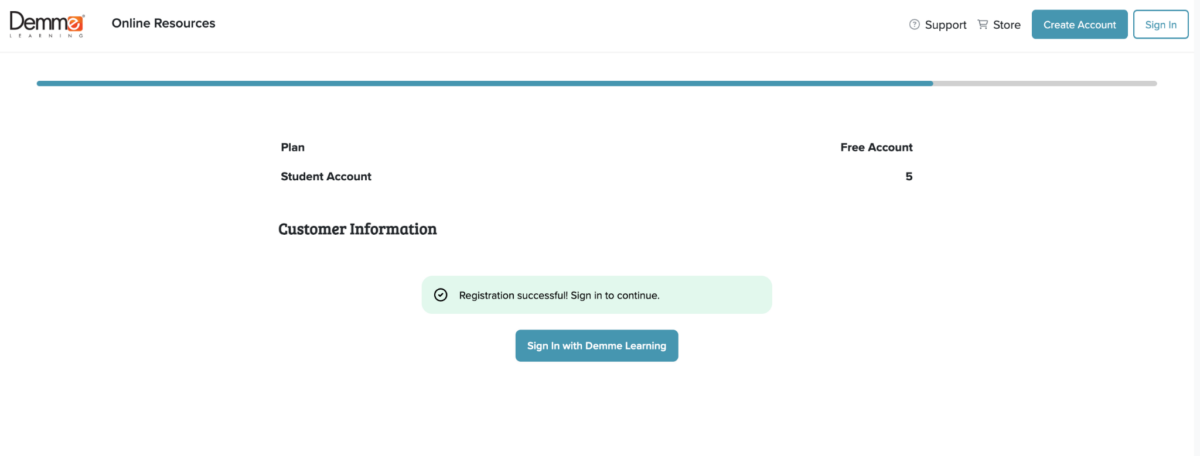
- Once registered, you will see a green box confirming your registration. Sign in to your new Demme Learning account to continue.
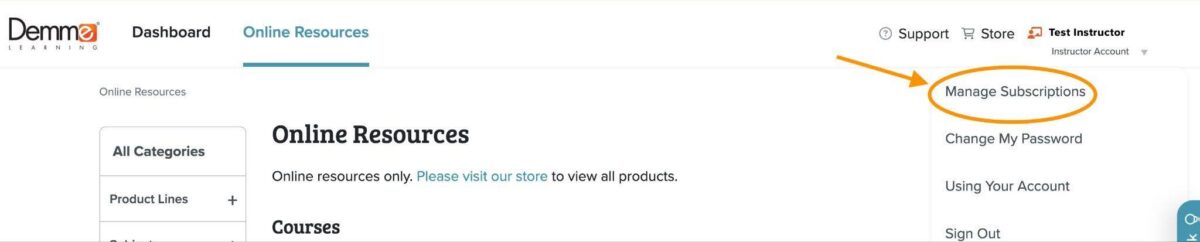
- After you are signed in, click on “Instructor Account” under your name in the upper right. Then click “Manage Subscription”.
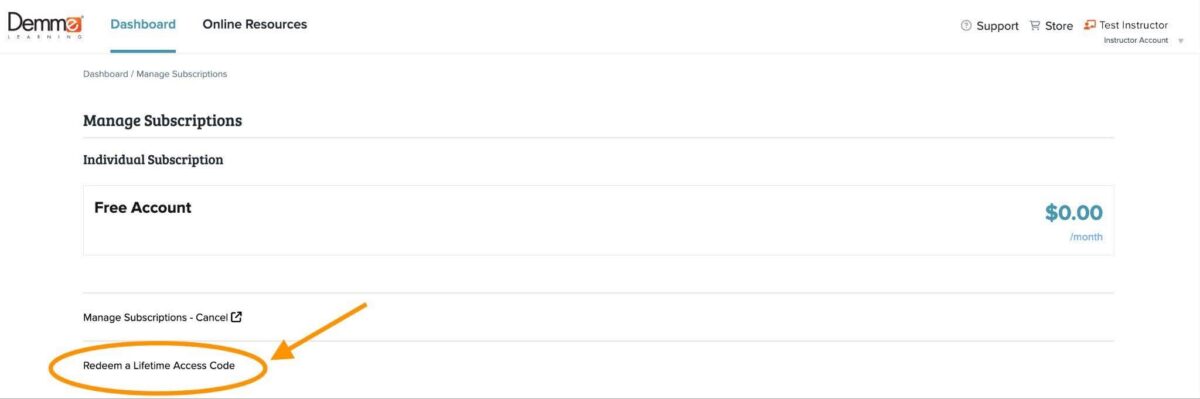
- Click on the “Redeem a Lifetime Access Code”

- Enter your code as it appears on your card. Include any dashes ( – ) when typing it in.
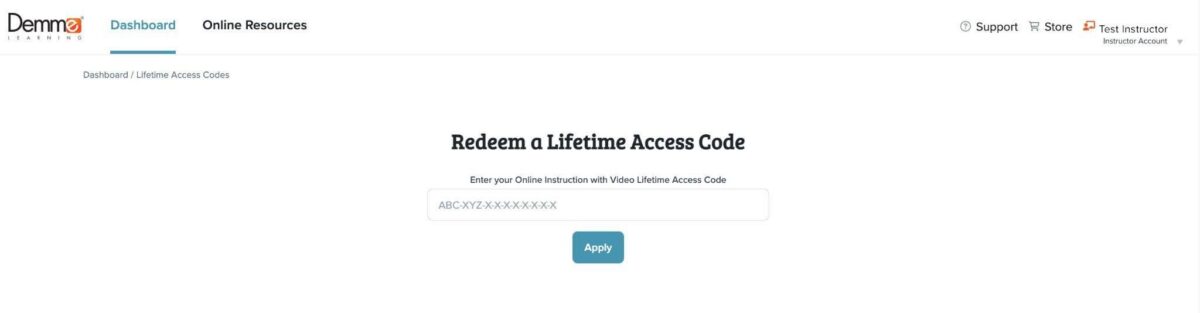
- Click “Apply”. You will see the confirmation page that your lifetime access code has been activated. You can now navigate to your dashboard and will have access to your Online Instruction with Video course in your library.

If you are a returning customer that has a free account or an active subscription on new.demmelearning.com:
- Navigate to new.demmelearning.com and sign into your account using the button in the upper right.
- After you are signed in, click on “Instructor Account” under your name in the upper right. Then click “Manage Subscription”.

- In the Manage Subscription area, click on the “Redeem a Lifetime Access Code” link.
- Enter your code exactly as it appears including any dashes ( – ). Then, click “Apply”. A confirmation message will appear letting you know you’ve redeemed your code.
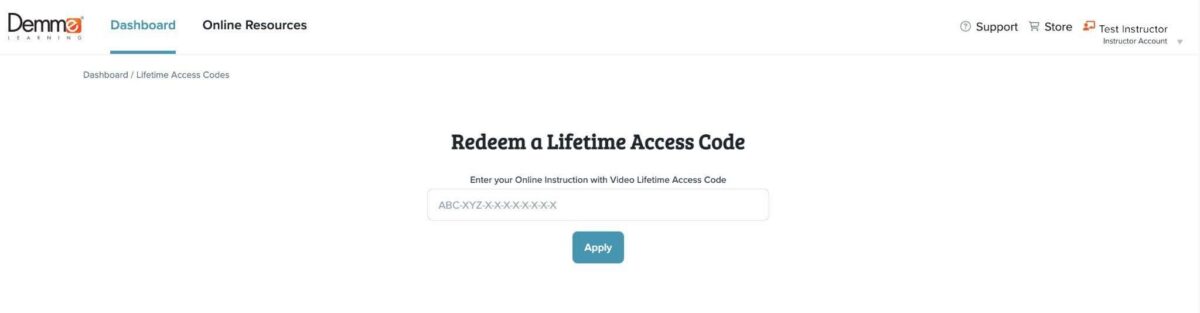

- Once redeemed, navigate to the dashboard and you will see all of your Online Instruction with Video Lifetime access courses within your library.
Access Code Frequently Asked Questions
Question: Can I redeem Individual – Essential Plan – Annual Access Card towards my annual subscription renewal?
Answer: No, not at this time. Due to system limitations you can not apply a code towards the renewal of an active subscription. If you have an active subscription and would like to use your access code, you will need to allow your subscription to expire. Don’t worry, if your subscription expires your student account, course progress, and library will not be lost. You will be able to subscribe to a ‘new’ plan using your access code and retrieve all your progress and settings.
We are actively working to improve our systems so this may be an option in the future.
Question: How will I be able to tell my Online Instruction with Video Lifetime access courses from my Subscription courses?
Answer: Any Online Instruction with Video levels that you have lifetime access to will show within your Library with a “Lifetime Access” tag in the upper right of that level. If at any point you remove an Online Instruction with Video course that you have lifetime access to from your library you will see an alert letting you know that it will not free a course credit from your subscription and letting you know that you can add it back to your library at any time.
Question: I lost my Online Instruction with Video lifetime access code, but I have my receipt. Will you accept that as proof of purchase?
Answer: If you have purchased an Online Instruction with Video access codes through our third-party wholesale partners, please reach out to the specific vendor listed on your receipt. They should be able to verify your purchase in their system and assist you. If you’ve purchased directly from Demme Learning we will be able to look up your order in our system and verify the purchase.
Question: I have a free account and want to redeem my subscription code, but do not have the “Subscribe to a plan” button. How can I redeem my code?
Answer: To redeem your subscription code, please contact our customer service team. Our system only allows one active individual subscription at a time. Right now it recognizes a free account as a subscription and will need to be manually overridden by our customer service team.